
Version 1.1 — released September 2026
Offer Cash on Delivery only where it pays off.
FlexiCOD is a WooCommerce plugin that extends the built-in Cash on Delivery gateway instead of replacing it. It adds the conditions that decide when COD appears at checkout — shipping location, customer role, cart contents — and an optional fixed or percentage COD fee.
WooCommerce 8.0+WordPress 6.5+PHP 7.4+HPOS supportBlock-based checkout support
The one-switch problem
COD is the method your customers demand and the one that costs you money.
Refused deliveries, invented addresses, remote-area shipping you end up absorbing. The usual answer is to switch Cash on Delivery off for everyone — which quietly removes the payment method half your market actually trusts.
Built into WooCommerce
COD is on, or it is off
A single toggle on the Cash on Delivery gateway. COD is available to everyone, everywhere, at any cart value, at no extra charge — or it is available to nobody.
Added by FlexiCOD
COD is on when it should be
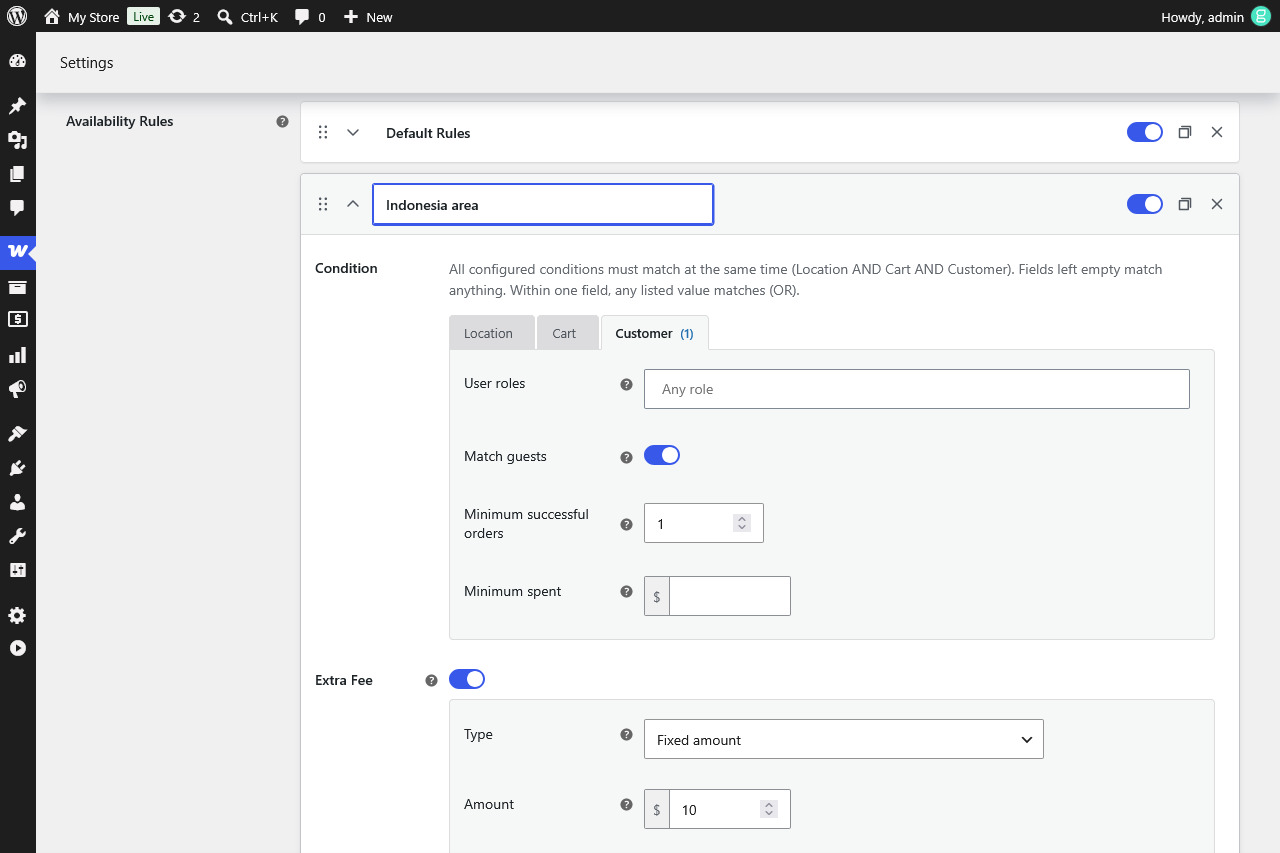
A rule. COD appears when the order matches the location, cart and customer conditions you set, carries the fee you attached to it, and is replaced by your own message when it does not.
Features
Keep COD where it works. Price it where it is risky. Hide it where it is not worth the loss.
Restrict by location
Offer COD only where your couriers actually collect. Match on shipping zone, country, state, city or postcode — leave a field empty and it matches everything.
Restrict by cart contents
Keep COD off the orders that keep coming back. Filter by products, categories and shipping classes.
Restrict by customer
Decide who gets to pay in cash. Limit COD to chosen user roles, or turn it off for guest checkout entirely.
Fee that travels with the rule
Each rule carries its own surcharge — fixed or percentage, your own label, taxable with the tax class you pick. Show it on the cart page too.
Works with the checkout you already run
Classic checkout, Checkout Blocks and HPOS. FlexiCOD wraps the core COD gateway instead of replacing it.
Deny rules Pro
A hard block that overrides everything above — by customer, location or cart. Phone numbers, wildcard patterns and CSV import too.
Partial COD Pro
Let customers pay an advance online now and the rest in cash on delivery. Offer it as a choice or require it, on every availability rule or only the ones you pick.
COD orders table Pro
One screen for every COD and Partial COD order, with the amount still due, filters, bulk mark collected and an outstanding-total header.
FlexiCOD vs FlexiCOD Pro
FlexiCOD is one complete rule, not a locked demo.
FlexiCOD Pro is the same plugin with the one-rule limit lifted and the harder cases covered. The whole difference is below, line by line.
Scroll sideways to see the full table.
| Feature | FlexiCOD | FlexiCOD Pro |
|---|---|---|
| Availability rulesDecide when COD is offered and what it costs. | 1 rule | Unlimited, drag-ordered, duplicate |
| Restrict by locationShipping zone, shipping method, country, state, city and postcode. | ||
| Restrict by cart contentsProducts, categories and shipping classes, each matched as any or all. | ||
| Restrict by cart valuesAmount (with or without tax), weight, item count, applied coupon, stock and backorders. | — | |
| Restrict by customerUser roles and guest checkout. | ||
| Restrict by order historyMinimum successful orders and minimum lifetime spend, net of refunds. | — | |
| Extra COD feeFixed or percentage, per rule, with your own label, tax class and optional cart-page display. | ||
| Percentage fee capsA floor and ceiling so small and large carts stay sane. | — | |
| “COD unavailable” messageTell shoppers why COD is hidden instead of showing a blank checkout. | Global | Global + per deny rule |
| Deny rulesA hard block that overrides every availability rule — by customer, location or cart contents. | — | |
| Block a person preciselyUser account, exact email, *@domain wildcard or phone number. | — | |
| Partial CODAdvance paid online, remainder in cash on delivery — fixed, or a percentage with its own floor and ceiling. | — | |
| Partial COD controlOffer it as a choice or require it, scope it to chosen rules, and hide the full COD option. | — | |
| Amount due, everywhereThank-you page, customer emails, the admin order list and the edit-order totals. | — | |
| COD orders pageEvery COD and Partial COD order with paid and still-due amounts, filtered by type, month, customer and status. | — | |
| Works with your checkoutClassic checkout, Checkout Blocks and HPOS, on WooCommerce’s own COD settings page. | ||
| Debug loggingLog why COD was allowed or hidden on each request while you are setting rules up. |
Pricing
Start free. Pay when one rule stops being enough.
The free edition lives on WordPress.org and stays free. Pro is one licence a year, priced on the number of live sites you run it on. Prices are in USD.
FlexiCOD
One availability rule with its fee, on classic and block checkout.
$0
Download from WordPress.orgFlexiCOD Pro
Everything in FlexiCOD, plus unlimited availability rules, more restrictions, deny rules, Partial COD and the orders page to collect on.
$29.99 per year
Questions
Answers before you install.
Does FlexiCOD replace the WooCommerce Cash on Delivery gateway?
No. It wraps the Cash on Delivery gateway that ships with WooCommerce and never registers a payment method of its own. Anything already integrated with WooCommerce COD — your theme, your order emails, your shipping plugins — keeps working exactly as it does today.
Where do I find the settings?
On WooCommerce, Settings, Payments, Cash on delivery. FlexiCOD adds no admin menu of its own: the rule, the fee and the unavailable message all live on the gateway page you already use.
Does it work with the block checkout and HPOS?
Yes, both from day one. FlexiCOD supports the classic checkout and WooCommerce Checkout Blocks, and it is safe to use with High-Performance Order Storage.
What can a rule check?
Location: shipping zone, shipping method, country, state, city or postcode. Cart: products, categories and shipping classes, matched on all of them or on at least one. Customer: user roles and guest checkout. Pro adds cart values — amount, weight, item count, coupon, stock and backorders — plus order history.
Can I charge an extra fee for COD?
Yes. The fee belongs to the rule: fixed or percentage, with your own label, taxable under the tax class you choose. Pro adds minimum and maximum caps on percentage fees.
What happens when a customer matches no rule?
Cash on Delivery is hidden at checkout and your custom unavailable message is shown in its place, so the shopper understands why the option is missing instead of assuming the checkout is broken. In Pro each rule can carry its own message.
What is Partial COD?
A Pro feature: the customer pays part of the order online now and the rest in cash when it arrives. You can offer it as an option or require it, on every rule or only the ones you choose, and the COD orders table shows what is still due on delivery.
Is there a money-back guarantee?
Yes. If within 7 days of purchase Pro does not work as expected and we cannot resolve it, we issue a full refund.
Do local and staging sites use up a license activation?
No. Development domains such as localhost, .local and .test are not counted against your site limit. Only live production domains consume an activation.
Do I keep the free plugin installed alongside Pro?
No. Pro is a complete standalone plugin that already includes everything in the free edition. You install Pro in place of the free version, not next to it.
What is the difference between the three Pro tiers?
Only the number of live sites you can activate on. Personal covers 1 site, Freelancer 5 sites and Developer an unlimited number, and all three include every Pro feature.
Get started
Offer Cash on Delivery only where it pays off.
Write your first rule in a few minutes with the free plugin, or go Pro for the full set of conditions and controls.